Leaderboard
How traders are ranked: return on starting balance in three separate pools (Free trial, Evaluation, Funded), over a chosen window, with a qualification floor and an opt-out. And the monthly Points board.
The Leaderboard ranks accounts by return on their starting balance, so an account of any size can rank fairly against any other. It is always on and has no prizes and no entry: an eligible account appears once it has closed enough trades in the window you are looking at. Ranking is on realized results, the trades an account has closed, net of fees.
You need to be signed in to see it. Opening the Leaderboard signed out takes you to sign in, and brings you back to the board afterwards. Trader profiles are public and open for anyone.
It is not a tournament. Tournaments have their own ladders, and tournament accounts never appear here.
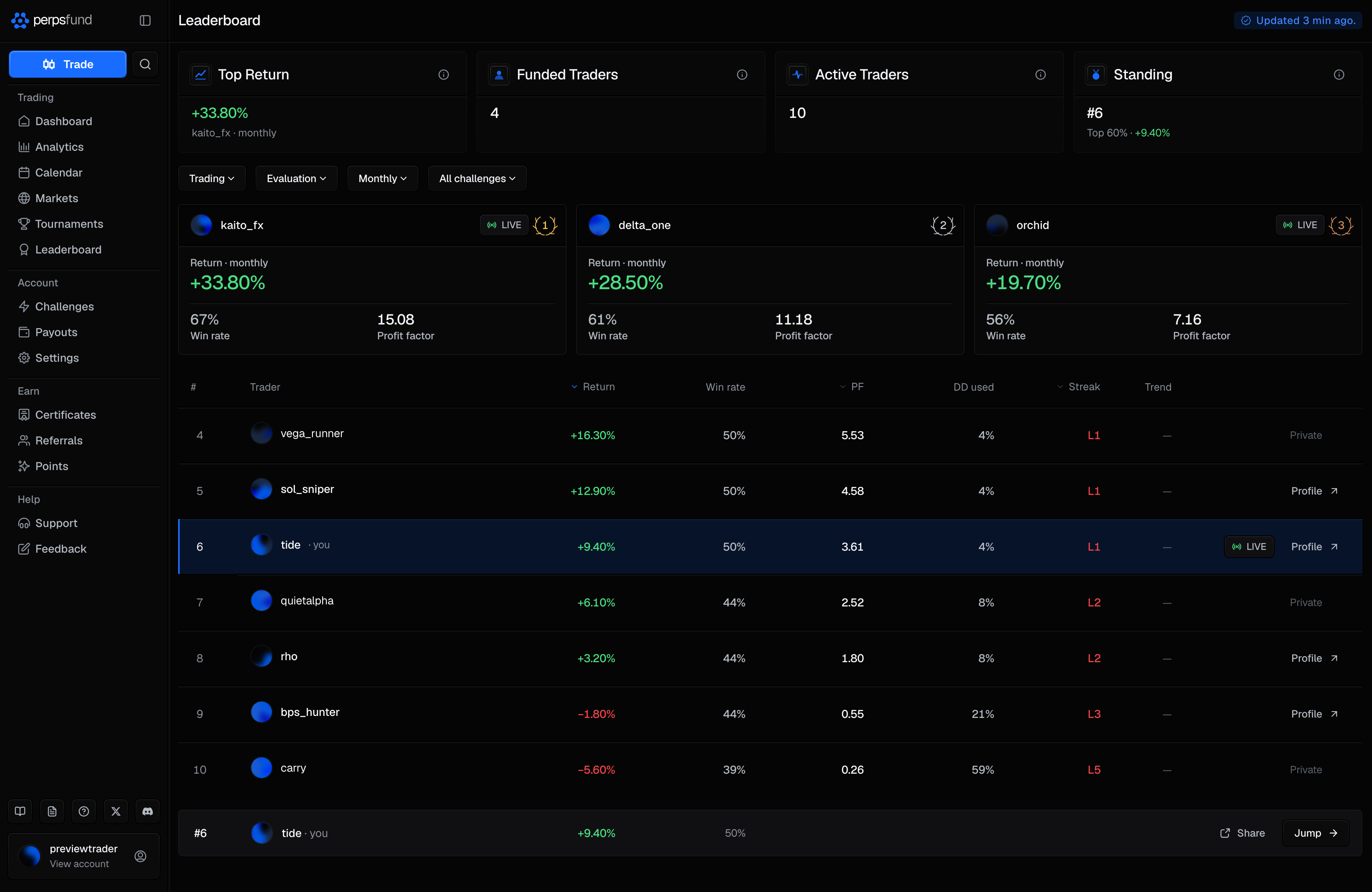
The pool and the timeframe
Four dropdowns above the board decide what it shows. On the phone, each one opens a sheet.
| Control | Options | What it does |
|---|---|---|
| Board | Trading / Points | Trading is the board this page describes. Points is the monthly Points board; choosing it hides the other three dropdowns. |
| Account pool | Free trial / Evaluation / Funded | Ranks one pool at a time. The three are always ranked separately. |
| Timeframe | Daily / Weekly / Monthly / All-Time | Counts only trades closed in that window. Daily, Weekly and Monthly are rolling windows that end now, not calendar periods. |
| Challenge filter | All challenges, or one account size and challenge type | Narrows the board to accounts of that size and type. Not shown on the Free trial pool. |
The pools hold different accounts:
| Pool | Who is in it |
|---|---|
| Free trial | Free-trial accounts. |
| Evaluation | Evaluations in progress, other than free trials. |
| Funded | Funded accounts, and a passed evaluation until its funded account is issued. After that, only the funded account ranks. |
The board currently opens on the Free trial pool. That default can change, so check the Account pool dropdown to see which pool you are looking at.
The Points board
Choose Points in the Board dropdown to see the month's points ranking. It is a separate ranking from the trading board: it does not use the pools, the timeframe or the qualification floor.
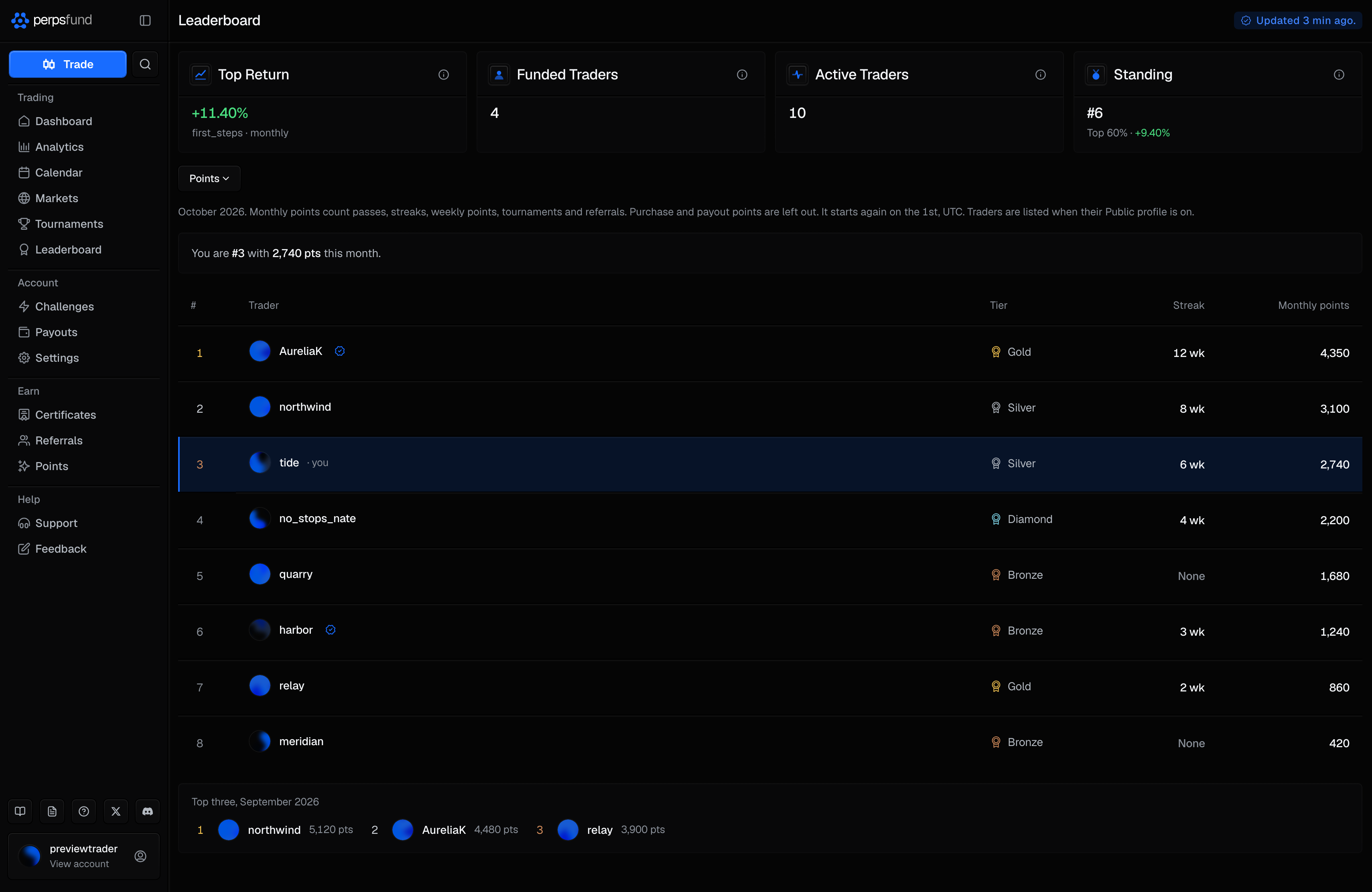
| Column | What it shows |
|---|---|
| # | Rank for the calendar month (UTC), among listed traders. |
| Trader | Handle and picture, linked to the trader's public profile. |
| Tier | The trader's points tier. |
| Streak | Their current consistency streak, in weeks. |
| Monthly points | Points earned this month from passes, streak milestones, weekly points, tournament placements and referrals. |
- Purchase and payout points are not counted. They are earned per dollar, so the board never shows a figure that says what a trader spent or was paid, and a place cannot be bought.
- You are listed only with Public profile on. It is the same switch that makes your trader profile public, in Settings. With it off you are not on the board, and a line above the table tells you the place you would hold. Only you see that line.
- It starts again on the 1st. The top 100 are shown.
- Last month's top three stay under the table for the following month. They earned a placement award and that month's profile frame (Points). A trader who turns Public profile off is removed from it.
- Show on leaderboard does not affect it. That switch covers the trading board and tournaments only.
The headline stats
Four cards sit above the board. A blue badge beside the title says when the board was last updated, for example Updated just now. or Updated 2 min ago.
| Card | What it shows |
|---|---|
| Top Return | The best return among ranked accounts in the current pool, timeframe and challenge filter, with its trader. |
| Funded Traders | How many traders hold a funded account or a passed evaluation. |
| Active Traders | How many traders have at least one account that has not breached or expired. |
| Standing | Where your best account ranks, within its pool. |
The podium
When at least three accounts rank, the top three appear as cards above the table, each with its return, win rate and profit factor. The table then starts at #4. With fewer than three ranked accounts there is no podium and the table lists everyone.
The ranked table
Each row is one qualifying account, sorted by return, highest first. The definitions below are the ones in the table's own column tooltips.
| Column | What it means |
|---|---|
| Trader | The trader's username and avatar. A public profile's name links to it. |
| Return | Return on starting balance, size-normalized so accounts of any size rank fairly. This is the default sort. |
| Win rate | Share of closed trades that were profitable. |
| PF | Profit factor: gross profit divided by gross loss. |
| DD used | Share of the max-drawdown allowance used at its worst. |
| Streak | Current win (W) or loss (L) run. A trade that closed exactly flat ends the run. |
| Trend | Rank change versus the previous period. |
You can also sort by PF or Streak. A small † after a return means it is measured from a later starting point than the account's opening, for example since the account was funded. Hover or tap it to see which.
The last column holds a Profile button when the trader has a public profile, or the word Private when they do not. A LIVE pill (with a green signal mark) beside it means the trader lets others watch their terminal read-only: select it to open the live view.
A small mark beside a handle is the leaderboard flair: a cosmetic a trader bought with points for that calendar month. It says nothing about performance and does not affect ranking.
Your standing and sharing
The Standing card shows one of three things:
| It shows | When |
|---|---|
| Start an evaluation to appear on the board. | You have no account on the board. |
| Your return, and how many more trades you need to rank | Your account has not closed enough trades in the window. |
| Your rank, your percentile (Top N%) and your return | You are ranked. |
Once you are ranked, a row pinned to the bottom of the table repeats your rank, return and win rate, with two buttons: Share makes a rank card to save or post, and Jump scrolls the table to your row (clearing the challenge filter first if your account is outside it). With a filter on, the pinned rank is your rank in the whole pool, not in the filtered list.
Qualifying and privacy
| Rule | Detail |
|---|---|
| Qualification | An account needs at least 1 closed trade(s) in the selected window to rank. Below that it is unranked. |
| Visibility | You appear by default. To leave the board, turn off Show on leaderboard under Privacy in Settings. Turning it off also removes you from tournaments and their prizes. |
| Breached accounts | A breached account does not rank. |
| Tournament accounts | Never ranked here. They rank only on their tournament's own ladder. |
| Passed evaluations | Once a passed evaluation's funded account is issued, the evaluation leaves the board and the funded account ranks in its place. |
| What is shown | Returns and ratios, never a dollar balance or a P&L amount. A row does not print the account's size, but the challenge filter narrows the board by size, so filtering shows which size a ranked account is. |
Why some accounts are not on the board
The board is not every account. A trader may have turned off Show on leaderboard, may not have enough closed trades in the window, may be on a tournament account, or may have breached. Ranking on return percentage rather than dollars means a small account trading well can outrank a large one.
Related
- How it works - the evaluation types and the path to getting funded.
- Analytics - the private version of these metrics for your own accounts.
- Trading rules - the drawdown and breach rules behind "DD used" and the excluded breached accounts.
- Trader profiles and Spectating - the public profile and the live view a row can link to.
- Tournaments - the separate ladders tournament accounts rank on.
- Settings - the Show on leaderboard switch.