Trader profiles
The public track-record page a trader can turn on - returns and risk stats in percentages, the account's size and status, and never a balance or position size.
A trader profile is a public page at /trader/<username> showing one trader's simulated track record: their
return, win rate, and the risk and consistency stats behind it, for each of their accounts.
Profiles are off by default. You turn yours on with Public profile under Privacy in Settings, and can turn it off again at any time. The same switch lists you on the monthly Points board.
When you'd use it
- To look up someone from the leaderboard - a ranked trader with a public profile has a Profile button and a linked name.
- To share your own record - Share profile copies the page's link to your clipboard (the button briefly reads Link copied). When the link is posted, sites that show link previews render a preview card for it.
- To judge a record honestly - figures built on only a few trades say so, with a note that they firm up as more trades close, so a short run is not presented as a track record.
What a profile shows
| Area | What it shows |
|---|---|
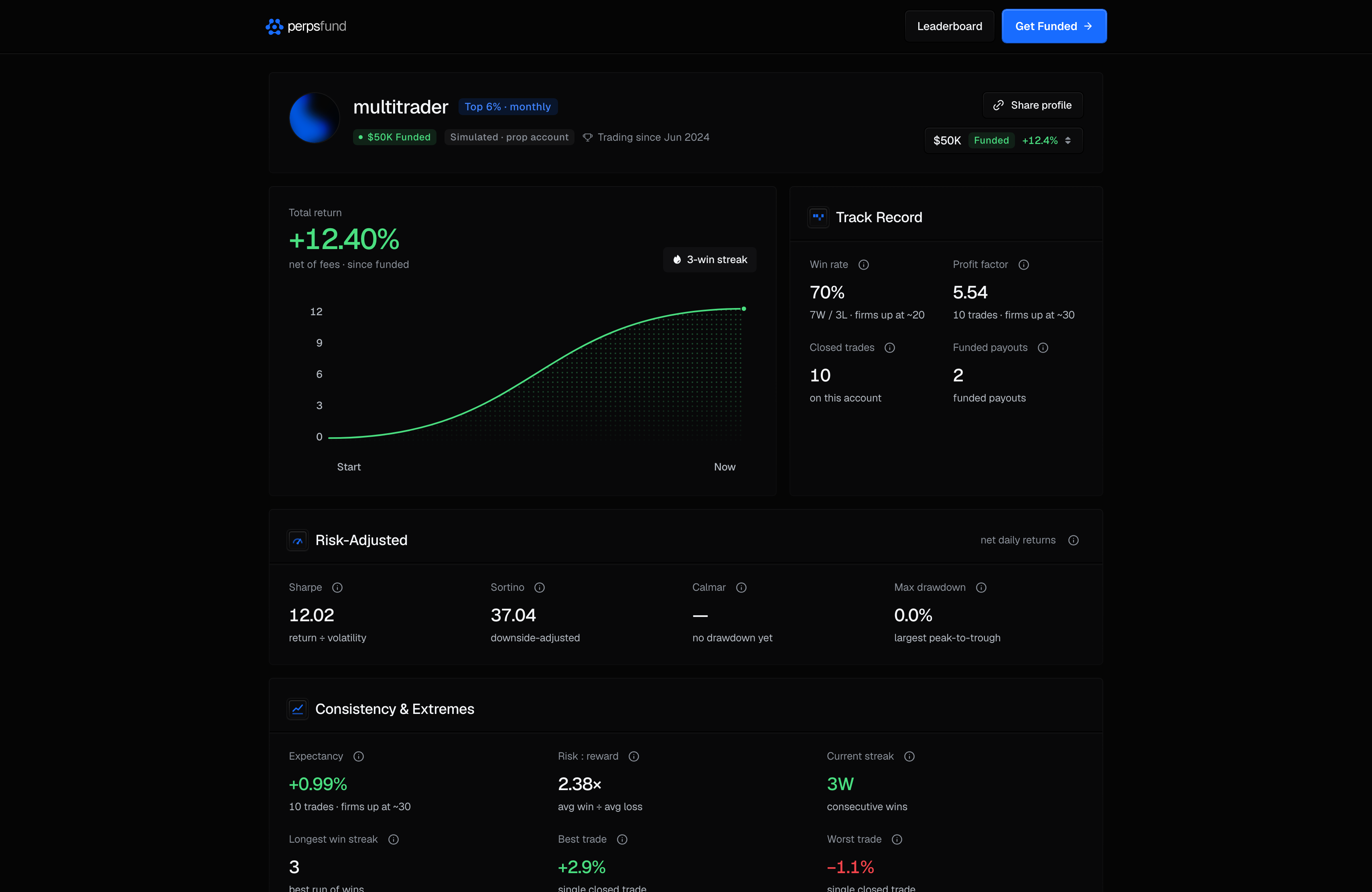
| Header | The avatar (with a frame around it if the trader holds a profile frame), the name (a display name with the @username, or the username), the account's size and status badge (for example "$50K Funded"), a Simulated · prop account tag, and the date the trader started. |
| Top N% · monthly | Where the account's return over the last month places it among ranked accounts in its leaderboard pool, as a percentile. It is not a rank number, and it appears only when the account qualifies for a rank in that window. |
| Buttons | Share profile (once the account has a closed trade), Watch live when the trader allows spectating, and the account switcher when they have more than one account on show. |
| Total return | The account's return, net of fees, and its return curve: a percentage, one point a day from the moment the return is measured from, ending at today's balance. The scale fits the curve and never spans less than 1 percentage point, so a quiet account looks quiet. |
| Track Record | Win rate, Profit factor, Closed trades, and Funded payouts (the number of payouts the trader has been paid, a count and never an amount). |
| Risk-Adjusted | Sharpe, Sortino, a return-to-drawdown ratio and Max drawdown. These show once the account has enough trading days to compute them. They are worked out the same way as on the trader's own Analytics page: Max drawdown is the deepest fall from a peak on the equity curve this profile shows, as a share of that peak, and a day's return is its net result divided by the account's equity at the start of that day. |
| Consistency & Extremes | Expectancy, Risk : reward, Current streak, Longest win streak, Best trade and Worst trade (the two trades as a percentage of the starting balance). A trade that closed exactly flat is neither a win nor a loss, and it ends a streak. |
| By Asset, by Day of Week | Where the return came from, by market and by the weekday a trade closed. |
More than one account. A trader's profile covers each of their eligible accounts. The switcher, which shows each account's size, status and return, picks which one the page shows. Funded accounts come first, then the best return over the last month.
Percentages and ratios, never balances
A profile shows returns and ratios in percentages, plus the account's size. It never shows the account's balance, its P&L in dollars, position sizes, or entry and exit prices. If you also turn on live spectating, people watching your terminal see far more, including your balance: see Spectating.
Privacy and eligibility
- A public profile is one switch. Letting people watch your live terminal is a second, separate switch - see Spectating.
- A private profile shows nothing to anyone else. Visitors see "This profile isn’t available", the same page they see for a username that does not exist, and the page is not indexed by search engines.
- You can preview your own private profile. Signed in, open your own
/trader/<username>and you see the full page with the note "This profile is private, visible only to you." and a Make it public link. - Which accounts appear. Evaluations in progress, funded accounts and passed evaluations. Breached accounts, free trials and expired accounts are never shown.
- The Top N% badge needs a qualifying account. An account needs at least 1 closed trade(s) in the last month for a percentile. Below that, the badge is left off rather than built on too little.
Turning your profile off removes the public page, and turns off live spectating with it.
Related
- Leaderboard - where ranked traders link to their profiles.
- Spectating - the separate switch for a live, read-only view of your terminal.
- PnL cards - images you can share of single trades and results.
- Settings - the Public profile switch.