PnL cards
Share a trade, a position, your performance, a rank, a payout, your points, your referrals or a month as an image, what each card shows and when it prints dollars, plus the certificates your account earns along the way.
PnL cards turn a result into an image you can post: a single trade, an open position, your performance, a leaderboard or tournament rank, a payout, your points, your referrals, or a month of trading. Every card opens in a modal with a live preview, the options for that card, and the export buttons below it. The page behind the modal blurs while it is open.
Most cards lead with percentages. A few print dollars, either because you switch it on or because the dollar figure is the point of the card; Dollar amounts lists exactly which.
Separately, your account earns certificates: permanent, downloadable records of starting an evaluation, passing it, reaching funded, and each payout you complete. They live on their own page and are covered at the bottom of this one.
The cards and where to find them
There are twelve cards.
| Card | Where you open it | What it shows |
|---|---|---|
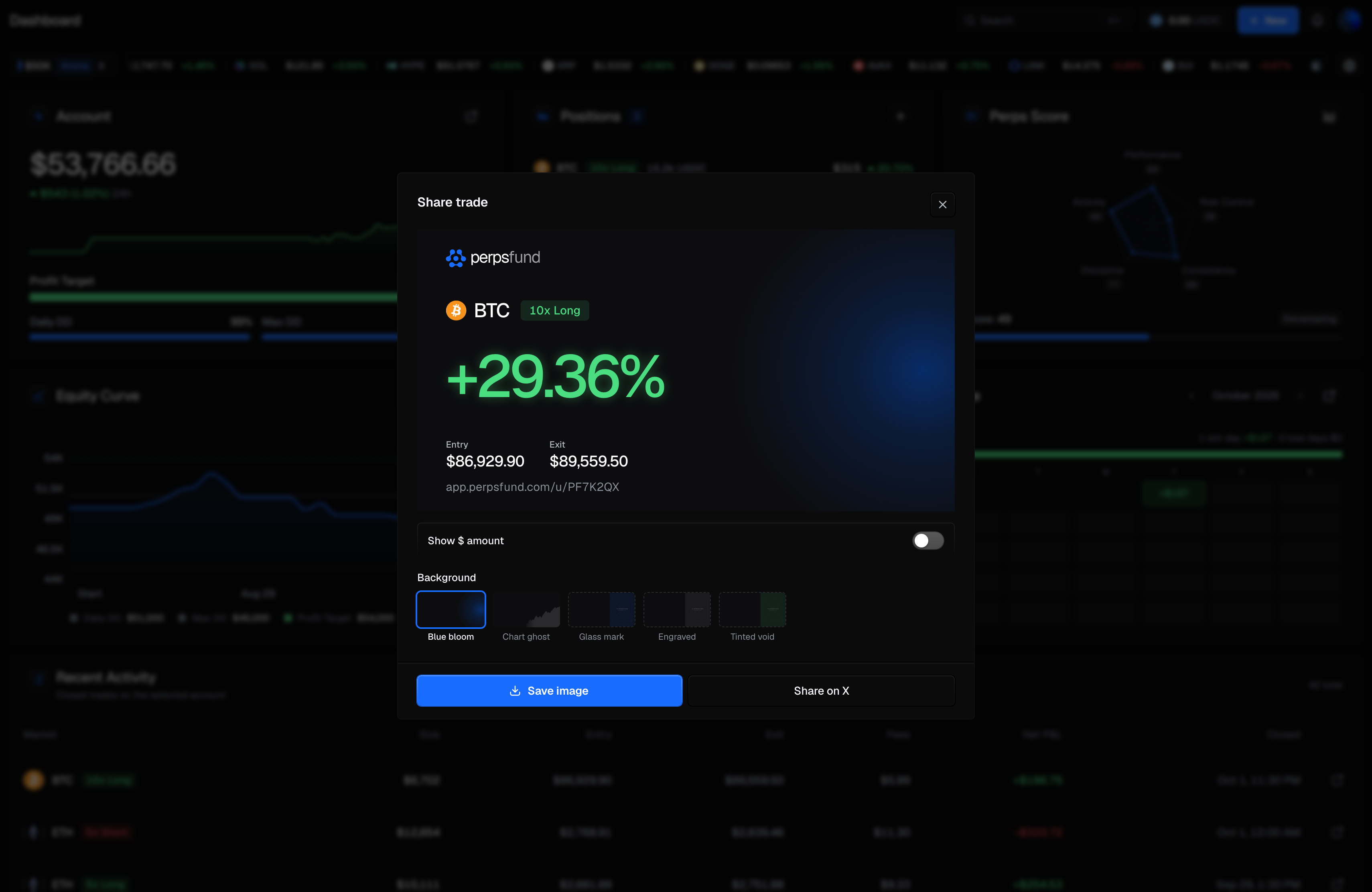
| Trade | The share icon on a closed trade: the Dashboard's Recent Activity, Analytics' Trade history, or the terminal's trade history. | The market, side and leverage, the return on the trade (ROE %), and its Entry and Exit prices. |
| Position | An open position: its share icon in the terminal, or Share P&L in the phone's position detail (Dashboard or terminal). | The same as the trade card, live, with Entry and Mark prices. |
| Performance | The share icon on the Dashboard's Account panel, on a computer or a phone, or Share on Analytics (the share button in the header on a phone). | Your return and stats: trades and win rate from the Dashboard; win rate, profit factor, R : R and trades for the Analytics period. Profit factor shows a dash until you have a losing trade. |
| Leaderboard rank | Share on your standing row on the Leaderboard. | Your rank, your percentile or the field size, your return, win rate and trade count. |
| Tournament rank | The share button on the Dashboard's Rank: line, while you hold a rank. | Your rank out of the ranked field, your return, and the tournament's name (marked Final once it has ended). |
| Withdrawal | The share icon on a paid payout in your payout history, or the window that opens when a payout is sent. | "Verified withdrawal": the USDC amount, the network and the transaction. |
| All-time payouts | The share control on the Total withdrawn band on Payouts. | The USDC total you have withdrawn, the number of payouts, and since when. |
| Challenge started | The window that opens on the Dashboard after you buy a challenge. | The account size, the profit target, the format and the profit split. |
| Achievement | The celebration window on the Dashboard when you clear phase 1, pass, or reach funded. | "Cleared", "Passed" or "Funded". |
| Points | The share button on the Available points panel of Points. | Your lifetime points, your tier with its medal, and your current streak in weeks, with your handle. |
| Referrals | The share button on Share & Earn on Referrals. | Your referral earnings to date in USDC, the number of traders who signed up through your link, and your referral code, with your handle. |
| Calendar | Share on the Calendar page, or on a computer the share button on the Dashboard's Performance panel. | The month as a grid: each day's P&L and number of markets, weekly totals, the month total and the all-time total, with your @handle. |
Every card carries your referral link, except the calendar card, which carries your @handle instead.
No account labels
No card carries a label saying what kind of account the result came from: not for a funded account, an account in evaluation, a free trial, a tournament, or all your accounts together. The withdrawal and all-time payouts cards record real USDC you were paid, with no paper or evaluation framing.
Dollar amounts
| Card | Dollars on it |
|---|---|
| Trade, Position | Only when you switch on Show $ amount: the card then adds the signed dollar P&L beside the percentage. |
| Withdrawal, All-time payouts | Always: the USDC you were paid is what the card certifies. |
| Referrals | Always: the USDC your referrals have earned you to date, paid out or not. |
| Calendar | Always: each day's P&L, the weekly totals, the month total and the all-time total, signed, in dollars. |
| Every other card | Never. They show percentages, ranks, points and counts. Points are never a dollar figure. |
Show $ amount is off by default. Your choice is remembered on this device and applies to every trade and position card you open after that. The account size ("$50K") can appear on the challenge-started card; no card shows your balance.
Backgrounds
Every card except the calendar card has a Background row of tiles under the preview. The finished backgrounds are Blue bloom and Chart ghost; other tiles in the row are marked as placeholder art. Each time you open a share modal it starts on Blue bloom, so the choice applies to that card only. The background you pick is the one you save or share.
Exporting
| Button | What it does |
|---|---|
| Save image | On a computer, downloads the card as a PNG ("Image saved"). On a phone, opens your device's share sheet with the image, so you can save it to your photos or send it ("Shared"). |
| Share on X | Opens a post on X with a line of text for the card and a link to perpsfund.com; the referrals card links your own referral link instead. The post does not attach the image; save it first if you want to add it. |
There is no copy-to-clipboard action.
Certificates
Certificates are a different artifact from a shared card. A card is something you generate about a result; a certificate is a record your account has already earned, and it appears on its own once the underlying fact is true. They are collected on the Certificates page, under Earn in the sidebar (on a phone, under Earn & payouts in More).
What earns one
| Certificate | Earned by | What it reads |
|---|---|---|
| Certificate of entry | Starting an evaluation | "Challenge accepted", the evaluation's size ("$50K evaluation"), and the month you started |
| Certificate of achievement | Passing a challenge (its final phase) | "Challenge passed", the evaluation's size, and the month you passed |
| Certificate of achievement | Reaching a funded account | "Funded trader", the account size, and the month you reached it |
| Certificate of achievement | Each completed profit payout | "Payout completed", which payout it was, and the month |
There is no certificate for clearing phase 1 of a Arena | 2-Step, and referral commission payouts do not earn one: only profit payouts on your own trading do. Free-trial accounts earn no certificates, and a tournament account earns no pass certificate.
The wall
The Certificates page shows every certificate you hold, newest first, with one led at the top.
| Element | What it does |
|---|---|
| The lead certificate | Your newest achievement (a pass, funded or payout) rather than your newest certificate of any kind, so starting another evaluation does not push a pass or funded card out of the lead. With no achievements yet, your newest entry certificate leads. |
| The list | Every certificate you hold, each titled by what distinguishes it: a funded one by its account size, a payout by which payout it was. |
| Save image | Saves the certificate as a PNG. There is no post-to-X action on a certificate. |
| Copy link | Makes this one certificate public at its own address and copies that address. See Share a certificate by link. |
Share a certificate by link
Open a certificate and press Copy link. That certificate gets a public page at its own address, a short
random id under /c/, and the address is on your clipboard. Nothing is public before you press it, and no other
certificate becomes public with it.
The page needs no sign-in. It shows the certificate, a Get Funded button that carries your referral, and a link to your profile if you have made your public profile visible. A link preview in a chat app shows the certificate itself. The page is not listed in search engines.
It shows what the certificate shows: your handle, the achievement, the account size or which payout it was, and the month and year. It shows no dollar figure other than the account size, no balance, no profit and no trades, and never your real name.
Once a link exists, the certificate's window says so and offers Turn off link. That removes the page: the address stops working. Pressing Copy link again later makes a new address; the old one does not come back. A copy someone already saved, or a preview a chat app already stored, is not removed.
Get Funded takes a visitor who is not signed in to sign-up, remembered as your referral as described in Referrals. A trader who is already signed in goes to the challenges.
What a certificate never shows
No dollar amounts, including in the filename
A certificate carries no balance, no profit figure and no payout amount, not on the artwork and not in the name of the file you save. The account size ("$50K") is the one figure that appears. The Leaderboard treats size the same way: you can filter the board by account size, but it never shows a balance. A payout certificate carries no size at all: it records which payout it was and when.
This is what separates a payout certificate from the withdrawal card above. The withdrawal card is a share card and deliberately shows the real USDC you were paid, with the on-chain transaction. The payout certificate is a record of the event, with no amount at all. They are two artifacts about the same payment, and only one of them carries a figure.
Two things that surprise people, and both are deliberate
- They are retroactive. Certificates are derived from what your account has already done, so every certificate you have earned exists now; nothing had to be issued at the time.
- A breach does not take one away. If a funded account later breaches, you keep its certificate. It records that you reached funded, which stays true. That is also why the wording is past tense, "Reached March 2026", never a claim about your status today.
Related
- Payouts - request a withdrawal, and the payouts that earn certificates.
- Analytics - your performance view, where the performance card comes from.
- Buying a challenge - starting an evaluation, which earns your first certificate.