Tournaments
Free trading tournaments: register before one starts or join while it runs, trade a tournament account the same size as everyone else's, and rank on net realized P&L. Each tournament sets its own window, rules and prizes.
A tournament is a free trading contest with a start, an end and a ladder. You join it, you get a tournament account of your own, and you rank against everyone else in it on the profit you realize over the window. It is separate from the Leaderboard, which is always on and ranks evaluation, funded and free-trial accounts on return.
Each tournament has its own name, dates, account size, loss limits and prizes, and several can run at once. There is no fixed calendar: a tournament opens when the firm schedules one, and at times none is running.
What a tournament is
| Tournament | Leaderboard | |
|---|---|---|
| Runs | One window with a start and an end, set per tournament | Always on |
| Who is on it | Entrants, each on the tournament account they got by joining | Evaluation, funded and free-trial accounts |
| Ranks by | Net realized P&L in dollars, after fees | Return on starting balance, as a percentage |
| Entry | Press Join. Free | None: eligible accounts appear unless hidden |
| Prizes | Set per tournament and shown on its page | None |
Finding a tournament
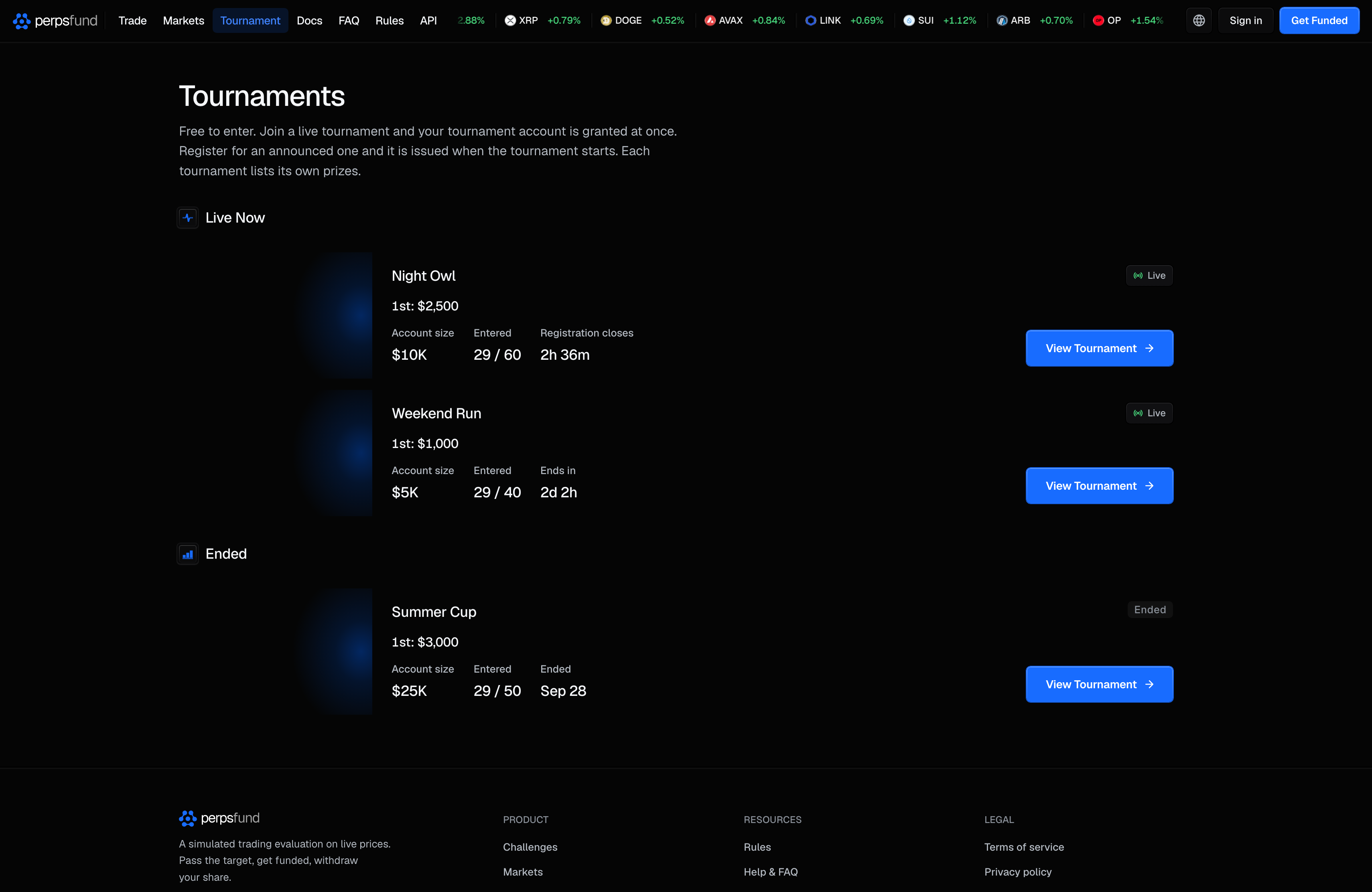
The public Tournaments page at /tournament lists every tournament, and you do not need to be signed in to read it. It has up to three sections:
| Section | What it lists |
|---|---|
| Live Now | Tournaments that are running |
| Registration Open | Tournaments that have been announced and have not started |
| Ended | Recent finished tournaments. Each one's page shows the final standings |
Every tournament is one card: its image, its name, the prize line when one is set, the account size, how many have entered or registered (and the cap, when there is one) and a clock (Registration closes, Ends in, Starts in or Ended). A tournament announced without a start time reads Starts: Coming soon in that seat. The badge in the card's top right corner says where it stands: Live, Registration open, Registration full or Ended. View Tournament opens its page.
When nothing is live or announced, the page says No tournaments right now, with Get Funded and See the Leaderboard. That is the normal state between tournaments, not an error.
Each tournament also has its own public page: its image, its name and state, the button to join or register, its figures (the clock, the window, the number entered, the account size and the prize pool when there is one), then the ladder with its prizes beside it. The button is repeated under the ladder. Once you are signed in, Tournaments in the sidebar opens the standings page for the live tournaments (see Your rank and sharing it). On a computer the row reads New while a tournament is open that you have not looked at since it started; opening the standings page clears it.
The terminal's top bar carries Tournaments too, and it answers to whoever is reading it: signed out, in the demo terminal, it opens this public list; signed in, it opens your standings, the same page the sidebar opens. So a visitor trying the terminal without an account reaches the tournaments themselves, not a sign-in screen.
Joining
Entry is free. What pressing the button does depends on whether the tournament has started:
- It is running. Press Join Tournament and your tournament account is created on the spot. This is the rest of this section.
- It has been announced and has not started. Press Register. You are registered, and your tournament account is issued when the tournament starts. See Registering before a tournament starts.
On a running tournament's page, press Join Tournament (at the top of the page or under the ladder). Your tournament account is created on the spot and becomes your active account, and a window opens with the tournament's image, your account's size, the time left and how many have entered, with Open the terminal and View leaderboard. Once you close it, the page reads Entered with Open Terminal beside it. Pressing Join again never creates a second account: each person has one entry, and one account, per tournament.
You can register before a tournament starts or join while it is live, until its registration closes (or, if it sets no registration cutoff, until it ends), and while it has spots left. When joining is refused, you see why:
| Message | Why |
|---|---|
| This tournament isn't taking entries. | It has closed, or was cancelled. |
| Registration for this tournament has closed. | Its registration cutoff, or its end, has passed. |
| This tournament is full. | Every spot is taken. |
| This tournament is open to a higher points tier than yours. Your tier is on the Points page. | The tournament asks for a minimum points tier and your lifetime points have not reached it. Entering spends no points. |
| This account can't enter tournaments right now. | The account is suspended, banned or scheduled for deletion. Contact support if that is a mistake. |
| Too many attempts. Please slow down. | Too many join attempts in a short time. Wait and try again. |
Joining when you do not have an account yet. On a tournament's page, pressing the button when you are signed out takes you to sign-up. Create your account, and you land on the dashboard already entered. For a running tournament the message is "You're in. This is your tournament account." For one that has not started it is "You're registered. Your tournament account is issued when the tournament starts." Finish signing up within 30 minutes of pressing the button for this to carry through. If the tournament filled up or closed in the meantime, the dashboard shows that reason instead.
Registering before a tournament starts
A tournament is announced before it starts. Its page shows a countdown, the start time in your own time zone (hover it for the time in UTC) and the list of traders who have registered.
A tournament with no start time yet. Some tournaments are announced before their start time is set. Their page reads Coming soon where the countdown would be, and shows a Length (how many days the tournament runs) in place of its dates. You register for one the same way. It starts when the Perps Fund team launches it: its window begins at that moment and runs for the length shown, and registered traders are told as described under When it starts.
In the app, when no tournament is running, the Tournaments page shows the announced tournament itself: its figures, the registered list and the Register button, so you can register and withdraw there. While another tournament is running, announced ones are listed under Registration Open, each with View Tournament. The sidebar shows New beside Tournaments until you have opened that page.
Registering. Press Register. The page then reads Registered, with Withdraw beside it. Registering is free and creates no account: nothing can be traded, won or lost before the start. Each person has one registration per tournament, and a tournament with a limited number of spots counts registrations against it.
Sharing your registration. Share beside Registered opens a card with the tournament's name and image, the account size, when it starts (in your own time zone, or Coming soon), how many have registered and your handle. Save image downloads it and Share on X posts it. The link on the card and in the post is the tournament's page with your referral attached, so someone who signs up from it and registers counts as your referral. A tournament with no image of its own lets you pick the card's background.
Withdrawing. Until the tournament starts you can press Withdraw beside Registered. Your registration is removed and your spot is freed. You can register again while registration is open. Once the tournament has started, a registration can no longer be withdrawn.
The registered list. While a tournament is announced, its page lists registered traders in the order they registered, with the total. If you have turned off Show on leaderboard in Settings you are counted in the total and your name is not shown.
Reminders. For a tournament with a published start time, registered traders get a reminder 24 hours before the start and another 1 hour before it: a notification in the app, and a push notification if you have those on. No email is sent for a reminder. You get a reminder only if you had registered by the time it was sent, and a tournament with no start time sends none. Turn them off under Milestones in Settings.
When it starts. The tournament starts at its published time, or, when it has none, when the Perps Fund team launches it. If you have its page open, the countdown reads Starting until it is live. Every registered trader is then issued a tournament account, at the size and limits the tournament's page shows, and is told once: a notification in the app, and an email titled "Tournament name is live" with a link to the account. The times in that email are in UTC. If you open the app, the tournament's page or the terminal before the notification reaches you, your account is issued at that moment. Scoring covers the tournament's published window for every entrant.
A registration does not become an account when, at the start, the account behind it is suspended, banned or scheduled for deletion, or the registration was removed by the Perps Fund team.
If the tournament changes before it starts. Your registration stands through any of these, and you can withdraw it before the start.
| What changed | How you are told |
|---|---|
| The start time moved | A notification in the app, and an email titled "Tournament name has a new start time". Both give the new start and end in UTC and the reason for the change. The reminders are sent again for the new time. |
| The end date, the registration close, the account size, the loss limits, the prizes, or whether it has a start time | A notification saying which of them changed. The tournament's page shows the current terms. |
| It was cancelled | A notification in the app, and an email titled "Tournament name is cancelled". The tournament has no results, nothing is awarded, and no entry counts against anyone. |
You are told about a change only if you were registered when it was made.
Your tournament account
The account you get by joining exists only for that tournament.
| Property | What it means |
|---|---|
| Size | Set by the tournament, and the same for every entrant, so the dollar P&L on the ladder compares like with like. |
| Cost | Free. It is not a purchase, it does not use up your free trial, and it does not count toward your paid-account limit. |
| No profit target | There is nothing to pass. A tournament account can never pass or become funded: the only goal is the highest P&L. |
| Loss limits | Each tournament sets its own daily loss limit and max drawdown, and either one may be No limit. Crossing a limit the tournament does set breaches the account. With neither set, the account breaches only if its equity is used up. |
| Badge | While the tournament runs, the account's badge carries the tournament's name wherever your accounts are listed, so it is never mistaken for an evaluation. After it ends, the badge reads Expired. |
| Leaderboard | Tournament accounts never appear on the general Leaderboard. They rank only on their own tournament's ladder. |
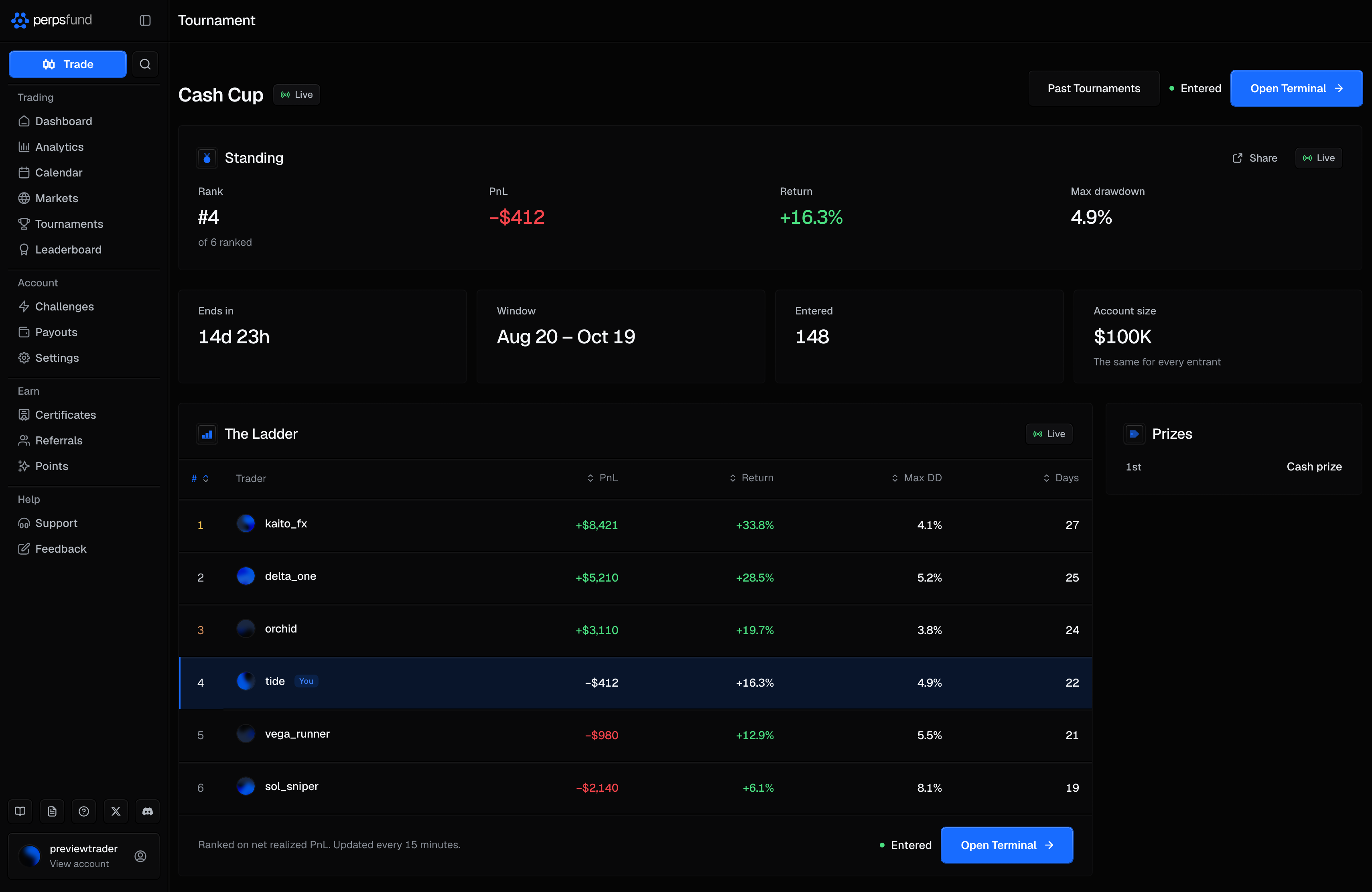
You trade it in the same terminal as any other account. On a computer, the terminal's Account section shows your Rank where an evaluation shows its Profit Target. On the dashboard, the Limits panel shows the tournament's limits, and a limit it does not set reads No limit rather than a number.
How the ladder ranks
Your score is your net realized P&L in dollars over the tournament's window: the profit and loss of the trades you closed, minus their fees. Open positions do not count until you close them. There are no minimum trading days and no cap on how much of the result one day can carry.
- A losing entrant still ranks. A negative P&L is a place on the ladder, below the entrants who are up.
- No closed trade, no rank. Until you close your first trade in the window you are Unranked.
- Disqualified. A breach during the window, or removal from the tournament by the firm, ends your entry. A disqualified entry keeps its row as history but never ranks.
- Recalculated every 15 minutes. Ranks and scores refresh on that schedule while the tournament runs. The up or down arrow beside a rank compares it with the previous hour's ranking.
The ladder's columns are the rank, the trader, PnL (the score, which sets the order) and Return (the account's percentage return over the window, shown for context). The standings page adds each entrant's max drawdown and active days.
Your rank and sharing it
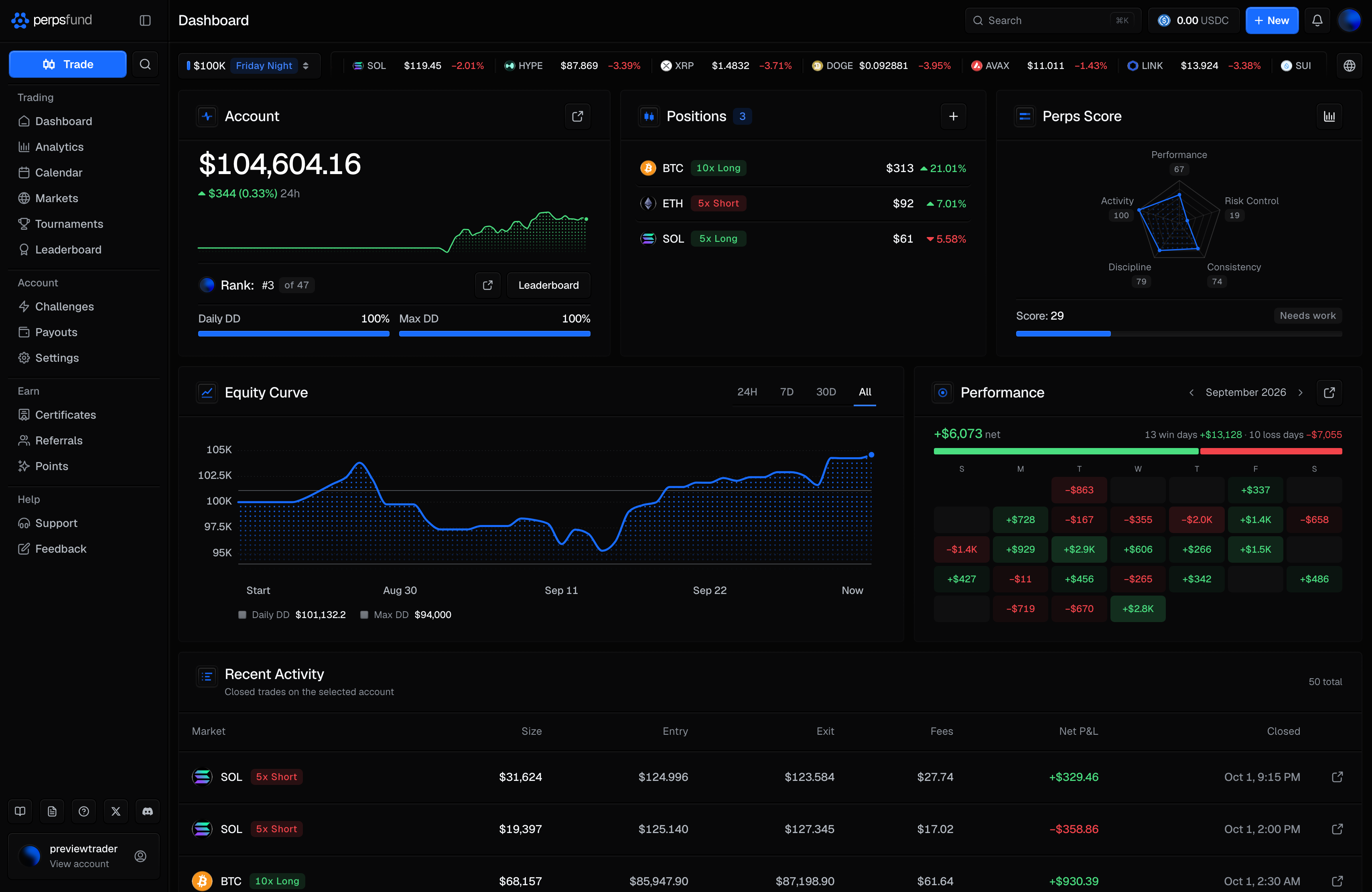
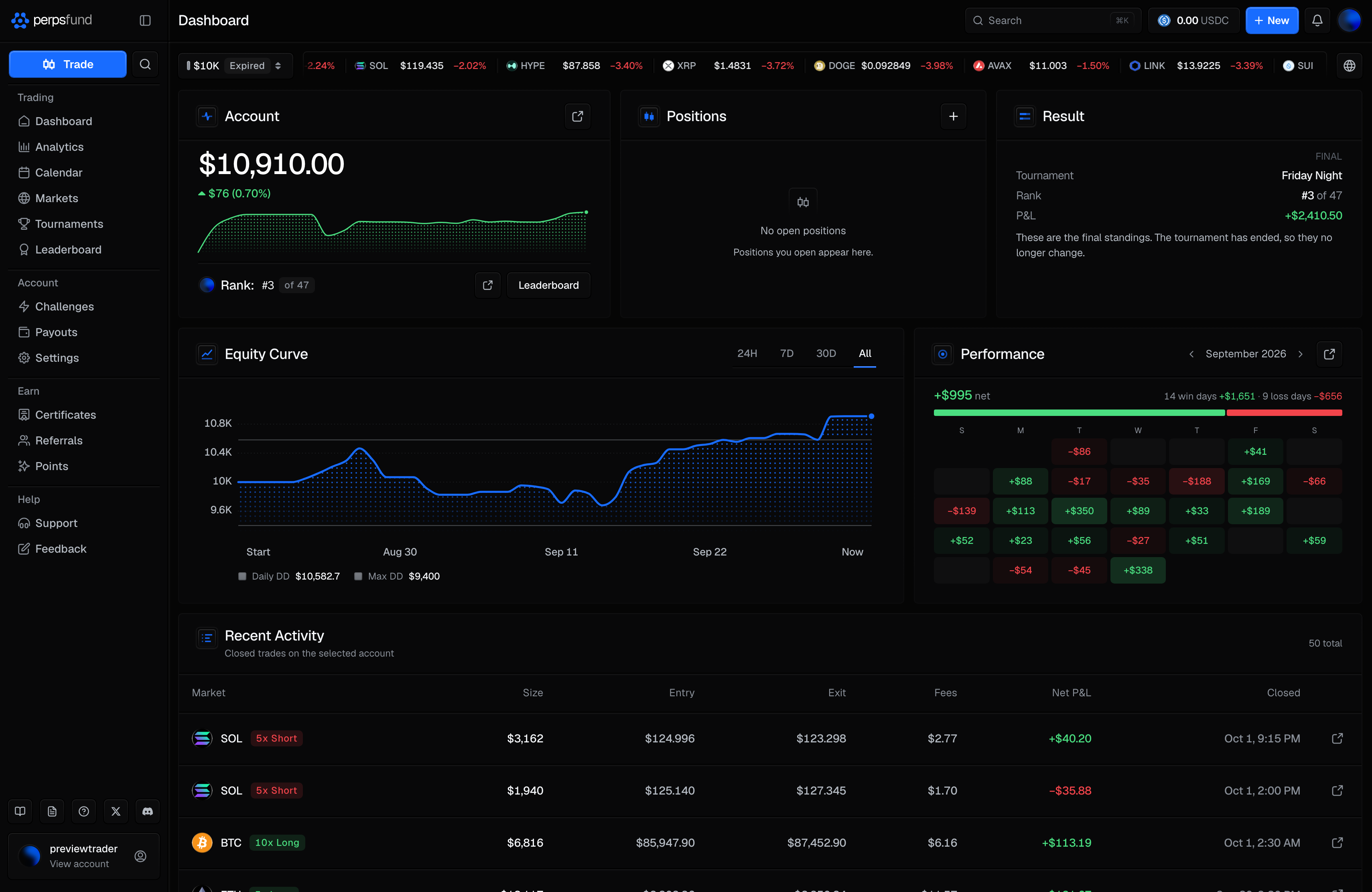
On the dashboard. With a tournament account selected, the Account panel shows your rank where an evaluation shows its profit target, on desktop and on the phone, with your avatar before it:
| It reads | When |
|---|---|
| Rank: #3 of 47 | You are ranked. "of 47" is a badge with the number of ranked entrants. |
| Rank: Unranked | You have not closed a trade in the window yet. |
| Rank: Disqualified | Your entry was disqualified. |
| Rank: Under review | Your entry is held for a linked-account review, and does not rank while it is. |
Tap the rank to see when it was last calculated ("as of 14:15 UTC", with how often it updates). Leaderboard beside it opens the tournament's standings, and when you are ranked, the share icon opens your rank card.
On the standings page. Signed in, Tournaments in the sidebar opens the standings. On a computer the bar across the top reads Tournament, and the tournament's own name heads the page under it. When more than one tournament is live, tabs switch between them. The page has the same parts as the tournament's public page: the name with its state badge, the figure panels, then the ladder beside Prizes. What it shows about you depends on where you stand:
| State | What it shows |
|---|---|
| Not entered | Join Tournament at the top of the page and under the ladder, while registration is open. Once it has closed, the button reads Registration Closed or Tournament Full. |
| Entered, no closed trade yet | Entered with Open Terminal, and a Standing panel reading "You are entered. Your rank appears after your first closed trade." |
| Ranked | The Standing panel with your Rank (and how many are ranked), PnL, Return and Max drawdown, and a Share button. Your row is marked You on the ladder. |
| The tournament has ended | The same panel, titled Result and marked Final. |
Below the ladder, Track Record lists your results from tournaments that have ended. Once any tournament has ended, Past Tournaments at the top of the page opens their final boards.
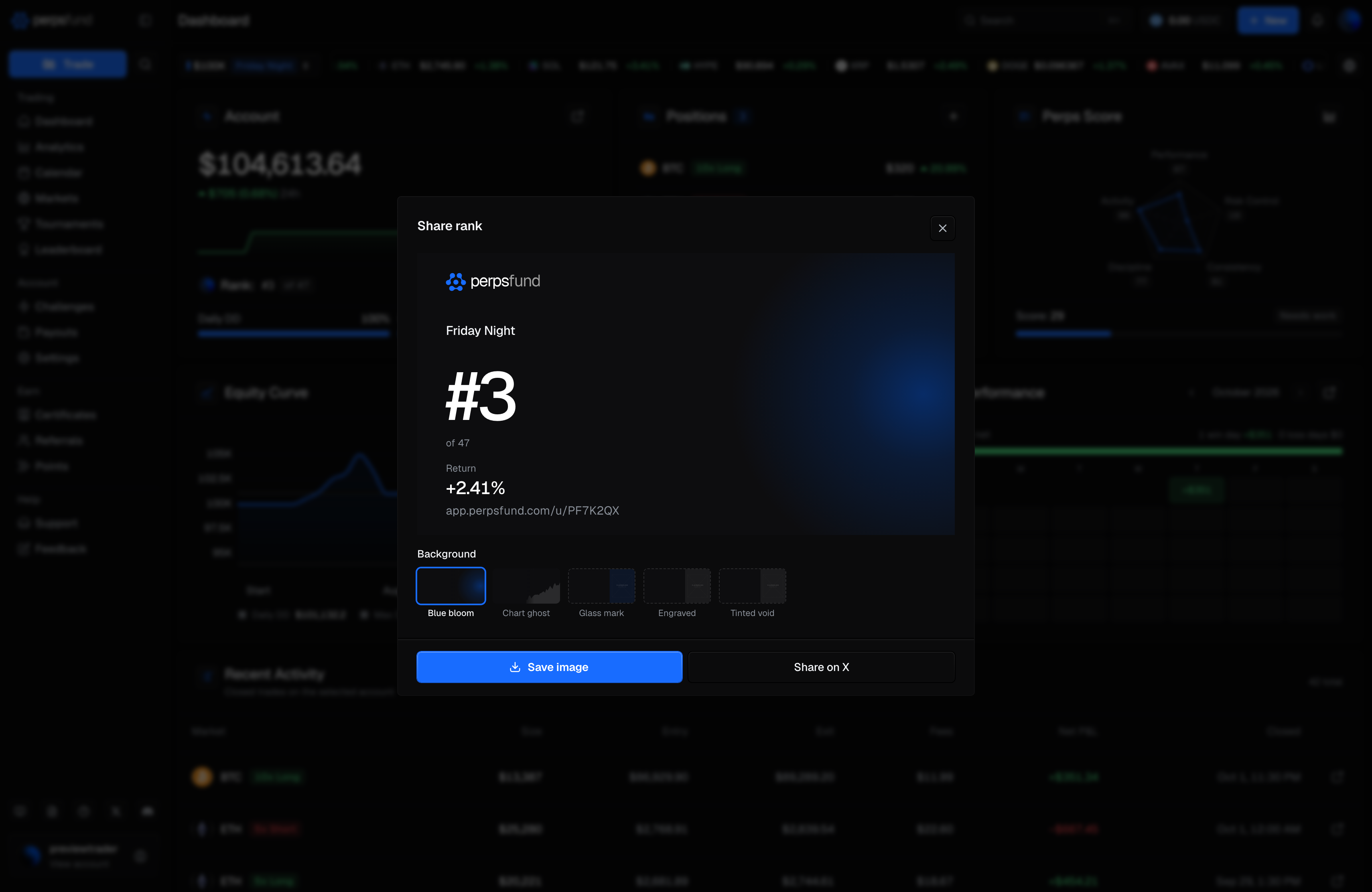
The rank card. Share opens a card with the tournament's name at the top, your rank (#N, with "of M" under it), and your Return as a percentage of the starting balance. The card never shows your dollar P&L or your balance. Pick a background, then Save image or Share on X. More on cards in PnL cards.
When it ends
Shortly after its window ends, the tournament closes and its ladder is final.
- Every tournament account still trading becomes Expired. It is read-only and keeps its full history. An account that breached during the tournament stays Breached.
- On the dashboard, the expired account shows a Result panel: the Tournament, your Rank, your P&L (or "No trades") and Final, with the note "These are the final standings. The tournament has ended, so they no longer change." The Leaderboard button now opens that tournament's final board.
- In the terminal, the account shows "Tournament over. This account is read-only and keeps its history." with Get Challenge, and the order button reads Trading paused.
- The final standings stay public on the tournament's page and under Ended on the tournaments page.
- On the standings page, the first time you come back after a tournament you placed in closes, a notice shows your final rank and the points you earned. If you do not hold a funded account it offers Get Funded, as do the top of a finished tournament's page and the foot of its ladder. If you do, none of them shows it.
If a tournament is cancelled, its page says so: it has no results, nothing is awarded, and no entry counts against anyone. Everyone who had registered for it or entered it gets a notification and an email saying it was cancelled.
Prizes and points
Prizes are set for each tournament and shown with it: under Prizes on its page, and on its card on the tournaments page. Only what a tournament lists is offered.
- Cash. Some tournaments award cash. You are eligible for a cash prize when you are ranked in good standing (not removed, not breached, not held for a linked-account review, and you have traded) and your identity is verified. You do not need a funded account. Eligibility is checked again when the prize is granted after the tournament closes: your identity must be verified at that point, and an account held for review, or a removal from the tournament, makes you ineligible. A cash prize is then paid the way a payout is.
- Placement points. Some tournaments award points to their top finishers when they close. Not every tournament does. When one does, the points follow this schedule and count toward your points tier:
| Finish | Placement points |
|---|---|
| 1st | 5,000 pts |
| 2nd-3rd | 2,500 pts |
| 4th-10th | 1,000 pts |
| 11th-25th | 400 pts |
Whether or not a tournament awards points, a finisher in the places above gets a notification with their final rank when it closes.
Visibility
Tournament ranking follows the same switch as the leaderboard. Turn off Show on leaderboard in Settings (Privacy) and you are also removed from tournament ranking, and from any prize that depends on it. Turn it back on and you rank again from the next update.
Related
- Leaderboard - the always-on ranking, which tournament accounts are not part of.
- Points - where placement points land and how tiers work.
- Payouts - the path a cash prize follows once it is awarded.
- Settings - the Show on leaderboard switch.