Markets
Browse every market you can trade, with the leader panels, the firm leverage ceiling on each market, and the per-market position caps, before you open the terminal.
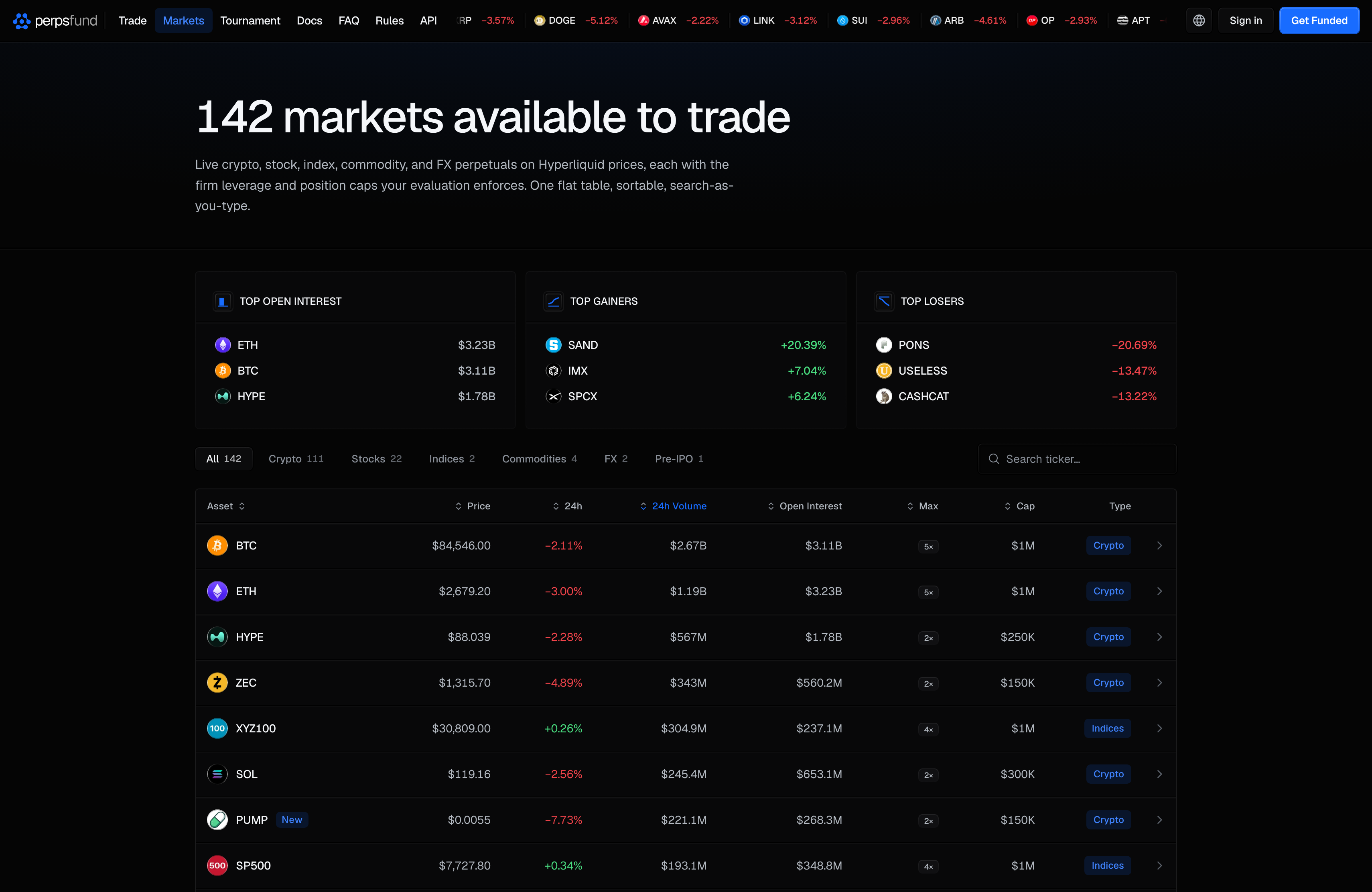
The Markets page is the public list of everything you can trade on Perps Fund: 140+ markets across crypto, stocks, indices, commodities, FX and Pre-IPO, all perpetuals priced off Hyperliquid. It shows the whole tradable set on one screen, with the firm's leverage ceiling on each market.
You do not need an account to open it. Signed in, it opens inside the app with your sidebar.
When you'd use it
- Before you buy a challenge, to check that the markets you trade are on the list.
- Before you place an order, to see a market's leverage ceiling. The limits are enforced when you place an order whether or not you looked them up first.
- To find a symbol: the list is searchable and filterable by market kind.
The leader panels
Three panels above the table rank the whole list: Top Open Interest, Top Gainers and Top Losers (by 24h change). They rank every market, whatever tab or search you have set below them. Selecting a row in a panel opens the same market detail as the table.
What each row shows
The tabs above the table filter it by kind: All, Crypto, Stocks, Indices, Commodities, FX
and Pre-IPO, each with its count. Search ticker… filters by symbol as you type. Every column header except Type sorts the table: click once (A to Z for Asset, biggest first for the numbers), again to reverse it, and a third time to clear the sort. To see one type of market, use the tabs.
| Column | What it means |
|---|---|
| Asset | The symbol and its kind. New listings carry a New badge. |
| Price | The latest price from Hyperliquid. |
| 24h | The change over the last 24 hours. |
| 24h Volume | Trading volume over the last 24 hours. |
| Open Interest | The total value of open positions in the market on Hyperliquid. |
| Max | The firm's leverage ceiling for the market, never above Hyperliquid's own maximum. It is the same small dark badge the terminal's market panel uses. |
| Cap | The most one account can hold in that market, in dollars, shortened to thousands or millions. It is the per-market position cap described below, the same figure the terminal's market search shows. For a market whose cap follows its open interest, it reads the smallest cap until the open interest has loaded. |
| Type | The market's kind. |
Prices, change, volume and open interest are fetched from Hyperliquid in your browser at a regular interval, not streamed tick by tick. If you go offline, the live cells show a dash until you are back. On a narrow screen some columns are hidden.
Pre-IPO markets are perpetuals on companies that are not yet listed on a stock exchange. They carry the same leverage ceiling as stocks, and their position cap comes from their open interest (see below). The tab can be empty at times, when no Pre-IPO market is listed.
The market detail
Selecting a row opens the market's detail (a dialog on a desktop screen, a sheet on a phone): the price and 24h change, a chart, 24h Volume, Open Interest, Funding · 1h with the time to the next funding, and Min order, then the Firm limits for the market. Trade followed by the symbol opens the terminal on that market.
The limits on each market
Two limits apply to every market, and both are the firm's:
- Leverage. The most you can use is the market's Max: the lower of the firm's cap and Hyperliquid's own maximum.
- Position size. A position can be worth up to your equity times your leverage, and each market also has an absolute cap per account: a fixed amount for BTC, ETH, SOL, HYPE and the TradFi markets, and for every other market (other crypto and Pre-IPO) a cap set by its open interest, so thinly traded markets carry smaller caps. The tighter of the two binds. The full table is on Placing an order, and the terminal's ticket shows the cap for the market you are on as Max Position.
An order that would break either limit is refused when you place it, so checking here is cheaper than discovering it at the ticket.
Where the rules live on this page. On a phone, the icon button beside the search box (its label is Trading rules) opens a summary of every plan's targets and loss limits, the position sizing and the fees, with a link to the full Rules. Each plan in it is headed by its family and its mechanic, written as Arena | 1-Step, Gauntlet | 1-Step, Hyper | 1-Step and Arena | 2-Step, with the number of phases beside it. On a desktop screen that button is not shown: use Rules in the site navigation or Trading rules in the app sidebar.
The reasoning behind the limits is in Trading rules.
What it is not
Markets is a browse page. It has no order entry and no account figures: you open a position in the
terminal, where the market selector (Cmd/Ctrl + /) lists the same set.